Flymind always with you

A convenient mobile app for parents and specialists

Use visual schedules, cards, and reports right on your phone or tablet — anywhere, anytime.

FlyMind iOS App

Flymind for iOS

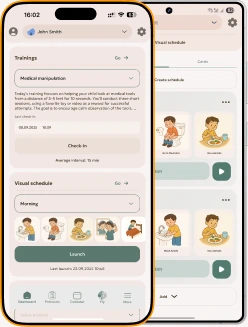
Download the Flymind app on your iPhone or iPad. Plan sessions, track your child’s progress, and use personalized ABA trainings and protocols — all from your device. Perfect for both parents and specialists.

Download:

Download on the App Store
FlyMind iOS App

Flymind for Android

Download the Flymind app on Android smartphones and tablets. Manage visual schedules, create cards, generate reports, and organize sessions with your child through an intuitive AI interface. Perfect for parents and ABA specialists.

Download:

Download on the App Store

The drag-and-drop visual schedule has really changed the way we communicate with our child.

Daniel

A great app for parents of children with ASD. Previously, I had to create cards in a single AI editor and record my progress in notes, but now everything is in one place, and the app can also create graphs based on the data.

Okeybaby21

I haven't found any downsides yet. Overall, I'm very happy with the platform. 😄

Olga

AI-generated images in a very cute cartoon style. There's even a GPT chat where you can ask questions about your child's progress.

Alex

My child looks forward to his daily assignments. I would recommend this app to anyone with a child with ASD.

Anna

What’s inside Flymind?

All the essential ABA tools — in one place.
The app helps you organize sessions, track progress, and keep a balance between learning and care.

Protocols

Protocols

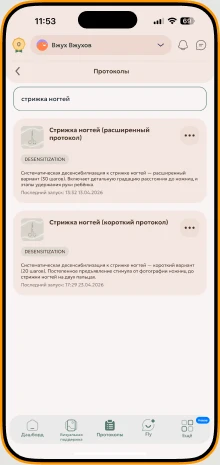
Personalized protocols help children build key skills — from self-regulation to everyday routines. The system adapts to each child and guides you step by step.

Calendar

Calendar

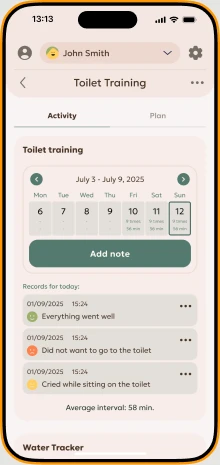
Schedule and log sessions in the calendar to visualize your child’s progress directly in the app.

Visual schedule

Visual schedule

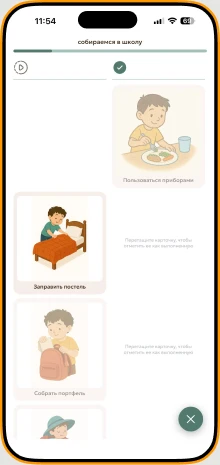
Create visual schedule cards in minutes.
 Just type a short description — and the AI will instantly generate clear, child-friendly images.

Training planner

Training planner

Training plans and activities to support behavior correction. Just fill out your child’s profile — the app will adjust the program for you.

Your personal AI assistant

Your personal AI assistant

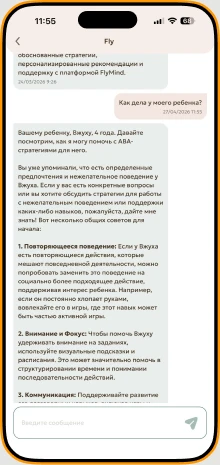
It knows your child’s unique needs, remembers their progress, and answers any questions about ABA methodology.
 The chat assistant guides you on how to launch protocols, structure sessions, and adapt training programs.

Frequently Asked Questions

I’ve never practiced ABA therapy with my child — can I still use the app?

Yes, you can use the app even if you’re not a specialist.
Flymind is designed to make ABA-based tools simple and accessible in everyday life, without requiring long courses or a professional background.
However, it’s important to understand that ABA is a science of behavior, and its effectiveness depends on how well you understand what you’re doing and why. The app will guide you through the process, help you structure activities, create visual supports, and track progress — but the core ABA principles (reinforcement, consistency, observation) are still worth learning at least on a basic level.
We recommend:
  • reviewing short materials on ABA principles (we’re gradually adding them directly into the app),
  • contacting a specialist or a parent community familiar with ABA if you need extra guidance or confidence.
The app doesn’t require certification or a degree — only interest, attention, and a willingness to learn something new.

How can I be sure the program created by AI is correct?

We follow the principle that AI is an assistant, not a behavior analyst.
It helps with ideas, structure, and saving time — but it cannot replace a real specialist.

The only reliable way to ensure that a program is correct is to consult a qualified professional in Applied Behavior Analysis (ABA).

AI does not see your child, does not know their individual traits or context, and therefore cannot account for all the factors needed to build a personalized protocol. It can create a foundation, but evaluating effectiveness and adapting the program always requires human involvement.

Using AI without understanding the principles of behavior analysis is a common mistake — not only in ABA, but in many fields.
AI is a support tool, not a replacement for a professional. When we recognize this, the results become more accurate, and the process becomes safer and more transparent.

Can I use the app in my professional work (for specialists)?

Yes — our tool is highly effective in professional work.
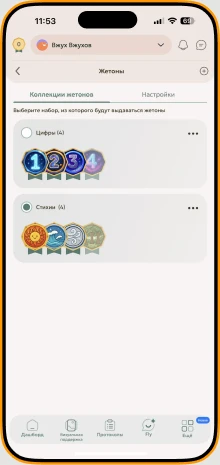
It helps specialists quickly create visual supports, manage token systems, and work in non-standard environments (for example, outdoors or in a swimming pool) without carrying sets of cards, Velcro, or additional materials.

In the hands of a specialist, the app becomes an even more powerful tool than in the hands of a beginner. This is where real synergy appears:
the specialist’s expertise covers everything AI cannot do — and AI takes over routine, repetitive tasks,freeing up time for analysis, observation, and direct interaction with the child.

Our goal is to enhance the quality of professional work, help structure processes, and eliminate unnecessary routine.
We’re always glad to see more specialists using the platform in their daily practice.

Can I add multiple children and track each one’s progress?

At the moment, this feature is partially available — you can add multiple children and work with their materials separately.
However, full progress tracking and data collection for each child is still in development.

This functionality is already included in our roadmap for next year. After launching the Protocols module, we plan to introduce automatic analytics and data visualization for each child’s profile.

We will definitely notify users once this feature becomes available in the beta version.

How much time should I spend on sessions with my child using Flymind?

Imagine learning a foreign language:
If you study for one minute a day, you’ll make progress — but very slowly.
If you practice regularly, use the language in daily life, listen, speak, and repeat — you learn much faster.

ABA works the same way.
It is a science of behavior, and lasting change requires practice and repetition.
Effective ABA programs typically include around 30–36 hours per week of learning and interaction.
This includes not only sessions with a specialist, but also everything parents do at home — everyday situations, reinforcement, visual prompts.

Flymind helps make these moments simpler, clearer, and more convenient — but it is a tool for quality, not a timer.
What matters most is not how many hours, but how you use the program:
regularly, intentionally, and with an understanding of why each step is important.

Do I need to buy additional materials or cards — or is everything included in the app?

Parent Plan
With the Parent plan, you receive 50 AI-generated images per month.
You can purchase an additional 50 images for 4$ per month.

Specialist Plan
With the Specialist plan, you receive 300 AI-generated images per month.
You can purchase an additional 100 images for 6$ per month.
Additionally, this plan offers the option to purchase 10 extra child profiles for 8$ per month.

Is the app suitable for children with different developmental needs?

No. The app is suitable for children with a wide range of developmental differences.
Applied Behavior Analysis (ABA) was never created exclusively for children with autism. It became widely known in that field because, at the time of its active adoption, there were simply no other effective tools for supporting autistic children.
However, ABA is successfully used with children who have:
Down syndrome,
  • genetic conditions (such as Prader–Willi or Phelan–McDermid),
  • and many other developmental profiles where building behavior, communication, and self-care skills is important.
When ABA methods are translated into a digital format — through AI or visual tools — their essence remains the same.
 ABA is still a science of behavior that can be applied to many different children, not only those with an autism diagnosis.

Can I share progress with other specialists or family members?

Yes, this feature is available.

You can share materials and activity results with other specialists, teachers, or family members so that everyone involved can see the child’s progress and work in a coordinated way.
We understand that successful therapy depends on teamwork, so we plan to expand collaborative access features in the future — allowing parents, therapists, and teachers to track the child’s progress and leave comments directly in the app.

How is my child’s and family’s personal data protected?

All personal data is securely encrypted and stored on protected servers.
Access is available only to authorized users. We use modern security methods and regularly update our protection systems to ensure the confidentiality and safety of all information.

Is there support available if I have questions about using the app?

Yes, of course.
You can contact our support team directly through the app or the web version of the service. We also provide an email for feedback — we aim to respond quickly and assist with any questions related to the app.
FlyMind iOS App

Flymind for iOS

Download the Flymind app on your iPhone or iPad. Plan sessions, track your child’s progress, and use personalized ABA trainings and protocols — all from your device. Perfect for both parents and specialists.

Download:

Download on the App Store
FlyMind iOS App

Flymind for Android

Download the Flymind app on Android smartphones and tablets. Manage visual schedules, create cards, generate reports, and organize sessions with your child through an intuitive AI interface. Perfect for parents and ABA specialists.

Download:

Download on the App Store

Try Flymind for Free

Parents and specialists around the world are already using Flymind to make life — and every child’s development — simpler and more effective. Join them and see the difference for yourself!

14 Days of Full Access

Profile
Profile
Profile
Profile
Profile
Profile
Profile
Profile
Profile
Profile
Profile
Profile
Profile
Profile
Profile
Profile